Posts

Enterprise Application Integration (EAI)

Image
Enterprise Application Integration is an integration framework composed of a collection of technologies and services which form a middleware  to enable integration of systems and applications across the enterprise.  Fundamentally, it is all about sharing and distributing data and processes among different applications and data sources of that enterprise. EAI could be divided into 4 integration levels: Data Level Application Interface Level Method Level User Interface Level Data Level:  It is actually a database-centric approach that involves the extracting of data from one database and updating it in other. At times the extracted data can be changed before entering it into that target database, for example, to apply specific business rules. It’s commonly done through ETL (Extract, Transform, and Load).  The main benefits of this approach are its low cost and low risk profile. Because in this, we don’t have to make any modifications to...
Exception handling in asp.net

An exception is an event, which occurs during the execution of a program, that disrupts the normal flow of the program's instructions.  The different approaches in ASP.Net to handle exceptions Use exception-handling structures to deal with exceptions within the scope of a procedure. try { ---- } catch { ---- } finally { -----} Use error events to deal with exceptions within the scope of an object. Page_Error - The Page_Error event handler provides a way to trap errors that occur at the page level. Application_Error - Application_Error event handler to trap errors that occur at the application level. Custom error pages to display custom error pages for unhandled exceptions at application level. <customErrors mode="RemoteOnly" defaultRedirect="~/errors/GeneralError.aspx" redirectMode="ResponseRewrite" />  The ResponseRewrite mode allows us to load the Error Page without redirecting the browser, so the URL stays...

SQL Server Session Management

SQL Server Session Management Configure SQL Server for ASP.NET SQL Server Session State in Custom Database. To install the session state database on SQL Server, run Aspnet_regsql.exe tool supply the following information with the command: aspnet_regsql -ssadd -sstype c -d < Database> -S <Server> -U <Username> -P <Password> ·          The name of the Database, using –d option. ·          The name of the SQL Server instance, using the   -S   option. ·          The logon credentials for an account that has permission to create a database on a computer running SQL Server. Use the   -E   option to use the currently logged-on user, or use the   -U   option to specify a user ID along with the   -P   option to specify a password. ·          The   -ss...

SOLID Principles for Object-Oriented Designing

Software design principles represent a set of guidelines that helps us to avoid having a bad design. The design principles are associated to Robert Martin who gathered them in "Agile Software Development: Principles, Patterns, and Practices". According to Robert Martin there are 3 important characteristics of a bad design that should be avoided: Rigidity - It is hard to change because every change affects too many other parts of the system. Fragility - When you make a change, unexpected parts of the system break. Immobility - It is hard to reuse in another application because it cannot be disentangled from the current application. Initial Stands for (acronym) Concept S SRP Single responsibility principle a class should have only a single responsibility. O OCP Open/closed principle software entities … should be open for extension, but closed for modification. L LSP Liskov substitution principle objects in a program should be replaceable with insta...

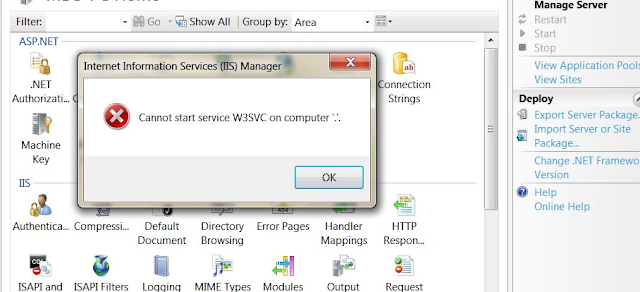
Cannot start service W3SVC on computer '.'.

Image
During debugging some code IIS on my PC was hanged and I was on unable to debug the code anymore. W henever I want to start it, the following error occurs. To resolve this issue, I did following steps: Run -> appwiz.cpl -> Turn windows features on or off -> Uncheck "Internet Information Services" and "Windows Process Activation Service" Restart your machine. Run -> appwiz.cpl -> install both "Internet Information Services" and "Windows Process Activation Service" During reinstalling of IIS, make sure all the required components and features would be selected to install.  After complete installation, register ASP.Net 4.0. To register open command promt and do the following. Open your command prompt ( Windows  +  R ) and type  cmd  and press  ENTER You may need to start this as an administrator if you have UAC enabled. To do so, locate the Command Prompt exe, right click and select "Run as A...

Iframe loading techniques and performance

Iframes are used to display a web page within a web page, load third party content, ads and widgets. The main reason to use the iframe technique is that the iframe content can load in parallel with the main page: it doesn't block the main page. There are two drawbacks in using iframe, Iframes block onload of the main page The main page and iframe share the same connection pool  The onload blocking is the biggest problem of the two and hurts performance the most. You really want the load event to fire as soon as possible. Here we will see different ways to load the iframe. Normal Iframe You all know this one. It's the default way to load an iframe and works in all browsers: <iframe src="/path/to/file" frameborder="0" width="728" height="90" scrolling="auto"> </iframe> Using the Normal Iframe technique will result in the following behaviour in all browsers: Iframe starts l...

ASP.NET SignalR

SignalR is an Async signaling library for ASP.NET to help build real-time, multi-user interactive web applications. ASP.NET SignalR is a library for ASP.NET developers that makes it incredibly simple to add real-time web functionality to your applications. What we mean to say "real-time web" functionality? Real-time web is the ability to have your server-side code push content to the connected clients as it happens, in real-time. HTML 5 introduces WebSockets which enables bi-directional communication between the browser and server. SignalR uses WebSockets under the cover when it is available and when WebSockets does not available, SignalR gracefully uses other techniques and technologies (i.e. Server-Sent Events, Forever Frame etc) while application code stays the same. SignalR provides a very simple, high-level API which calls JavaScript functions in your clients' browsers from server-side .NET code in your ASP.NET application using Remote Procedure Calls (RPC)...